

RudderStack lets you send your event data to Pinterest Tag using Pinterest's pintrk conversion tag via the device mode.
Identify
The identify call lets you create new or update existing customers and record the traits about them like their name, email address, etc.
When you make an identify call with a user’s email address and traits, RudderStack triggers the Pinterest set() method. This saves the identification parameters to be sent with the next events, so it is recommended to set the values as early as possible.
If you make an identify call without email, the identification parameter will not be set.
A sample identify call is shown below:
rudderanalytics.identify("1hKOmRA4el9Zt1WSfVJIVo4GRlm", { name: "Alex Keener", email: "alex@example.com",})In the above example, the identification parameter will be set to alex@example.com and the successive calls will be an Enhanced Match.
identify call is made, nothing appears in the network tab in your browser or in the tag helper extension. However, a hashed value for an em parameter is added in the next event call, in a JSON object encoded in the URL.Track
The track call allows you to capture user actions along with the properties associated with these actions.
A sample track call is shown below:
rudderanalytics.track("Order Completed", { checkout_id: "C324532", order_id: "T1230", value: 15.98, revenue: 16.98, currency: "INR"})RudderStack SDK sends the track event and any properties as custom properties to Pinterest.
E-commerce conversion tracking
RudderStack supports e-commerce conversion tracking for Pinterest. You can use the E-commerce Events Specification guide for sending the events while instrumenting your site with the RudderStack SDK.
The following table mentions some sample track events mapped to the Pinterest events:
| RudderStack event | Pinterest event |
|---|---|
| Order Completed | Checkout |
| Product Added | AddToCart |
| Products Searched | Search |
| Product List Filtered | Search |
You can also track a custom event that you want to include in the conversion reporting. It will be mapped to a custom Pinterest event, for example:
rudderanalytics.track("custom event")Standard Pinterest events
Pinterest supports the following nine standard events that can be mapped and tracked for reporting. Any event apart from these is treated as a user-defined event.
CheckoutAddToCartPageVisitSignUpWatchVideoLeadSearchViewCategoryCustom
Property mapping
Rudderstack maps the following properties to the Pinterest properties:
| RudderStack property | Pinterest property |
|---|---|
| query | search_query |
| value | value |
| order_quantity | order_quantity |
| currency | currency |
| order_id | order_id |
| promo_code | promo_code |
| property | property |
| video_title | video_title |
| lead_type | lead_type |
| coupon | coupon |
The following properties are nested within the e-commerce products array:
| RudderStack property | Pinterest property |
|---|---|
| product_id | product_id |
| sku | product_id |
| name | product_name |
| price | product_price |
| category | product_category |
| variant | product_variant |
| quantity | product_quantity |
| brand | product_brand |
Custom properties
You can send the custom properties to Pinterest by adding them in the Custom Properties section while configuring the Pinterest destination in RudderStack.
A sample snippet with custom properties is shown below:
rudderanalytics.track("Event", { customProperty: { customValue: 2, }, someRandomMailId: "user@gmail.com",})For the above snippet, the following properties must be added in the Custom Properties section:
customProperty.customValuesomeRandomMailId
Page
The page call lets you record your website's page views with any additional relevant information about the viewed page.
Pinterest's pintrk conversion tag sends any one of the following events when you make a page call:
ViewCategory: RudderStack sends this event if both thenameandcategoryfields are present. The below sample event contains both the fields and is mapped to the Pinterest'sViewCategoryevent:
rudderanalytics.page("Best Seller", "Games", { path: "/best-seller/games/1", url: "https://www.estore.com/best-seller/games/1", title: "Best selling games offered by EStore", search: "estore bestseller games", referrer: "https://www.google.com/search?q=estore+bestseller", testDimension: "true",})PageVisit: RudderStack sends this event if onlynamefield is present and drops any additional properties. The below sample event contains onlynameand is mapped to the Pinterest'sPageVisitevent:
rudderanalytics.page("Best Seller", { path: "/best-seller/1",})FAQ
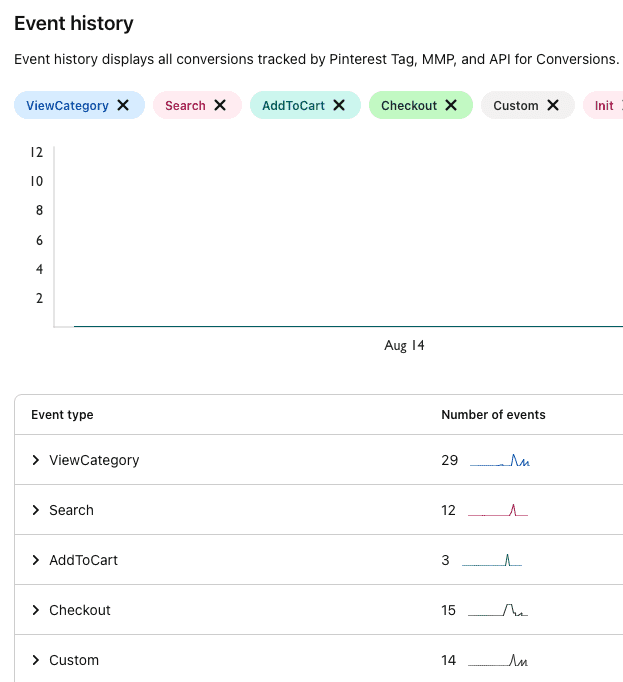
How can I verify if my events are being sent to Pinterest Tag?
Follow these steps to see your events in Pinterest Tag:
- Login to your Pinterest ads manager account.
- Click the Ads tab and select Conversions from the dropdown to see your events, as shown:
Contact us
For more information on the topics covered on this page, email us or start a conversation in our Slack community.