

PostHog is a complete product analytics stack built for data analysts and managers. It gives you easy access to scalable product analytics with full control over all your user data.
RudderStack supports PostHog as a destination to which you can seamlessly send your event data for analytics.
Getting started
Before configuring PostHog as a destination in RudderStack, verify if the source platform is supported by PostHog by referring to the table below:
| Connection Mode | Web | Mobile | Server |
|---|---|---|---|
| Device Mode | Supported | - | - |
| Cloud Mode | Supported | Supported | Supported |
Once you have confirmed that the source platform supports sending events to PostHog, follow these steps:
- From your RudderStack dashboard, add the source. Then, from the list of destinations, select PostHog.
- Assign a name to your destination and click on Next.
Connection settings
To successfully configure PostHog as a destination, you will need to configure the following settings:
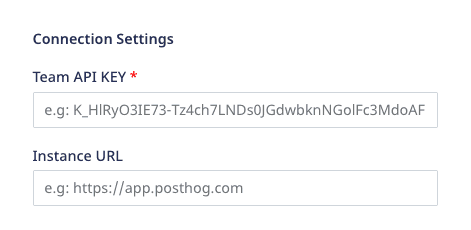
- Team API Key: Enter your PostHog team API key. This is a mandatory field.
For more information on obtaining your PostHog Team API Key, refer to the FAQ section below.
The settings are listed below:
- Instance URL: Enter your PostHog instance URL.
https://[your-instance].com.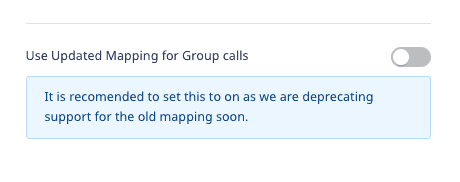
- Use updated mapping for Group calls: Enable this setting to send the
grouptraits as event properties to PostHog.
Web device mode settings
This section lists some of the other configurable settings when sending events to PostHog via the web device mode.
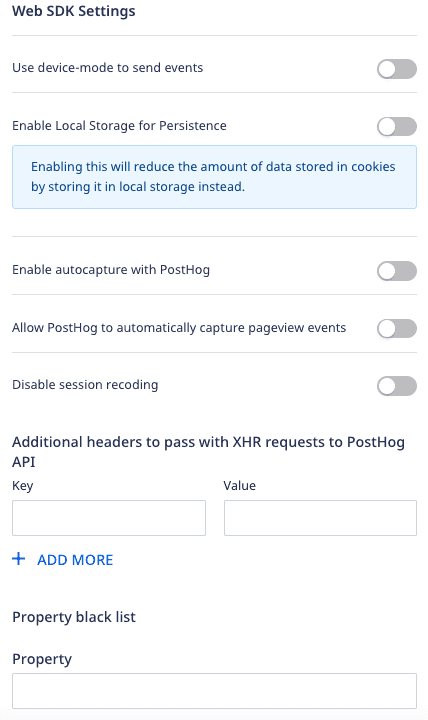
- Use device mode to send events: If enabled, RudderStack will send the events to PostHog via the device mode.
- Enable Local Storage for Persistence: Enable this option to reduce the amount of data stored in the cookies by storing it locally instead.
- Enable autocapture with PostHog: Enable this option to allow PostHog to send auto-captured events.
- Allow PostHog to automatically capture pageview events: Enable this setting to allow the PostHog web SDK to send a page view event every time it is loaded on a page.
- Disable session recoding: Enable this setting to stop PostHog from recording the user sessions.
- Additional headers to pass with XHR requests to PostHog API: Add a list of key-value pairs in this field. The RudderStack web SDK will then forward these headers on the event requests sent to PostHog.
- Property denylist - Add a list of traits or event properties that you want the PostHog SDK to filter.
Identify
To identify a user in PostHog, you need to call RudderStack's identify API.
A sample identify call is as shown below:
rudderanalytics.identify("1hKOmRA4el9Zt1WSfVJIVo4GRlm", { name: "Alex Keener", first_name: "Alex", last_name: "Keener", email: "alex@example.com", createdAt: "2019-07-23T23:45:56.000Z",})identify call to PostHog under the $set key according to the PostHog Identify API.Page
The page call lets you record your app's page views with any additional relevant information about the viewed page.
A sample page call is shown below:
rudderanalytics.page({ path: "/best-seller/1", url: "https://www.estore.com/best-seller/1", title: "EStore Bestsellers", search: "estore bestseller", referrer: "https://www.google.com/search?q=estore+bestseller",})In the above example, RudderStack captures information related to the viewed page such as its path, URL, referrer, etc.
page call, RudderStack sends $pageview as an event to PostHog according to the PostHog Page API.Screen
The screen call lets you record whenever your user views their mobile screen with any additional relevant information about the screen.
A sample screen call using RudderStack's iOS SDK is shown below:
[[RudderClient sharedInstance] screen:@"Home Screen" properties:@{@"category" : @"launcher"}];In the above snippet, RudderStack captures information related to the viewed screen such as its name and category.
screen call, RudderStack sends $screen as an event to PostHog according to the PostHog Screen API.Track
The track call lets you capture user events along with the properties associated with them.
A sample track call is shown below:
rudderanalytics.track("Order Completed", { checkout_id: "C324532", order_id: "T1230", value: 15.98, revenue: 16.98, shipping: 3.0, coupon: "FY21", currency: "INR", products: [ { product_id: "product-mixedfruit-jam", sku: "sku-1", category: "Food", name: "Food/Drink", brand: "Sample", variant: "None", price: 10.0, quantity: 2, currency: "INR", position: 1, value: 6.0, typeOfProduct: "Food", url: "https://www.example.com/product/bacon-jam", image_url: "https://www.example.com/product/bacon-jam.jpg", }, ],})track call as typecapture. and sends the user action as an event to PostHog according to the PostHog Capture API.Group
The group call lets you associate a particular identified user with a group, such as a company, organization, or an account.
A sample group call is shown below:
rudderanalytics.group("sample_group_id", { name: "CompanyA", location: "USA",})$group as an event to PostHog according to the PostHog Group API.Updated group mapping
RudderStack lets you use the updated mapping feature for the group calls where it maps the group traits as event properties before sending them to PostHog. To use this feature, enable the Use Updated Mapping for Group calls setting in the RudderStack dashboard, as shown:
When disabled (default), RudderStack sends the group traits to PostHog as received without any modifications, as shown in the following snippet:
{ "version": "1", "type": "REST", "method": "POST", "endpoint": "https://app.posthog.com/batch", "headers": { "Content-Type": "application/json" }, "params": {}, "body": { "JSON": { "groupId": "groupId27", "distinct_id": "sampleusrRudder7", "traits": { "groupType": "company", "KEY_3": { "CHILD_KEY_92": "value_95", "CHILD_KEY_102": "value_103" }, "name_trait": "Company", "value_trait": "Company-ABC" }, "messageId": "e5034df0-a404-47b4-a463-76df99934fea", "event": "$group", "api_key": "LNDs0JGdwbknNGolFc4HdoAE", "type": "group" }, },}When enabled, RudderStack sends the group traits as event properties to PostHog, as shown:
{ "version": "1", "type": "REST", "method": "POST", "endpoint": "https://app.posthog.com/batch", "headers": { "Content-Type": "application/json" }, "params": {}, "body": { "JSON": { "distinct_id": "sampleusrRudder7", "messageId": "e5034df0-a404-47b4-a463-76df99934fea", "properties": { "$group_key": "groupId27", "$group_type": "company", "$group_set": { "KEY_3": { "CHILD_KEY_92": "value_95", "CHILD_KEY_102": "value_103" }, "name_trait": "Company", "value_trait": "Comapny-ABC" }, }, "event": "$group", "api_key": "LNDs0JGdwbknNGolFc4HdoAE", "type": "group" }, },}The mapping is as shown:
| Group trait | Updated group mapping disabled | Updated group mapping enabled |
|---|---|---|
groupId | groupId | $group_key |
groupType | groupType | $group_type |
traits | traits | $group_set |
Alias
Calling alias passes userId and previousId to the PostHog queue.
A sample alias call in RudderStack is as shown:
rudderanalytics.alias("user01", "previous01")In the above example, previous01 gets mapped to distinct id in PostHog, while user01 gets mapped to alias in PostHog.
alias call, RudderStack sends $create_alias as an event to PostHog according to PostHog Alias API.Passing super properties in the PostHog web SDK
To pass super properties to the PostHog JavaScript SDK, you can pass the key-value pairs as shown:
- The following example will set
superKey1: "value1", superKey2: "value2"as super properties to the PostHog web SDK:
rudderanalytics.track("event", {prop: "value"}, { integrations: { POSTHOG: { superProperties: { superKey1: "value1", superKey2: "value2" } } }})- The following example will set
superKey3: "value3"as super properties just once and pass on to the PostHog web SDK:
// This will set {superKey3: "value3"} as set once super properties to PostHog SDKrudderanalytics.track("event", {prop: "value"}, { integrations: { POSTHOG: { setOnceProperties: { superKey3: "value3" } } }})- The following example unsets the previously set super properties:
// This will unset super properties superKey1, superKey2, superKey3 to PostHog SDKrudderanalytics.track("event", {prop: "value"}, { integrations: { POSTHOG: { unsetProperties: [ superKey1, superKey2, superKey3 ] } }})track, page, or identify calls of the RudderStack JavaScript SDK.Property mapping
RudderStack maps the following properties sent to the Posthog standard contextual properties:
| RudderStack field | PostHog field |
|---|---|
context.os.name | $os |
context.page.url | $current_url |
url | $host |
context.page.path | $pathname |
context.screen.height | $screen_height |
context.screen.width | $screen_width |
context.library.name | $lib |
context.library.version | $lib_version |
originalTimestamp,timestamp | $time |
context.device.id | $device_id |
request_ip,context.ip | $ip |
timestamp,originalTimestamp | $timestamp |
anonymousId | $anon_distinct_id |
userId,anonymousId | distinct_id |
context.screen.density | $screen_density |
context.device.manufacturer | $device_manufacturer |
context.os.version | $os_version |
context.timezone | $timezone |
context.locale | $locale |
context.userAgent | $useragent |
context.app.version | $app_version |
context.device.name | $device_name |
context.network.carrier | $network_carrier |
context.app.name | $app_name |
context.device.model | $device_model |
context.app.namespace | $app_namespace |
context.app.build | $app_build |
properties.viewport_height | $viewport_height |
properties.viewport_width | $viewport_width |
context.page.loaded | $performance_page_loaded |
context.campaign.source | utm_source |
context.campaign.medium | utm_medium |
context.campaign.name | utm_campaign |
context.campaign.content | utm_content |
context.campaign.term | utm_term |
$insert_id when you send event via the RudderStack device mode. However, when sending the events via the cloud mode, RudderStack does not map any value to this property.FAQs
How do I obtain the PostHog Team API Key?
To get your PostHog Project API Key or Team API Key, follow the steps below:
- Login to your PostHog dashboard.
- Go to the Settings tab under the Project section in the left sidebar.
- Find your key under Project API Key or Team API Key.
Contact us
For more information on the topics covered on this page, email us or start a conversation in our Slack community.