

Freshsales is a CRM tool that lets you discover the best leads, drive them to closure, and nurture them to boost contextual engagement.
RudderStack supports Freshsales as a destination where you can seamlessly send your event data.
Getting started
Before configuring Freshsales as a destination in RudderStack, verify if the source platform is supported by Freshsales by referring to the table below:
| Connection Mode | Web | Mobile | Server |
|---|---|---|---|
| Device mode | - | - | - |
| Cloud mode | Supported | Supported | Supported |
Once you have confirmed that the source platform supports sending events to Freshsales, follow these steps:
- From your RudderStack dashboard, add a source. Then, from the list of destinations, select Freshsales.
- Assign a name to the destination and click Continue.
Connection settings
To successfully configure Freshsales as a destination, you will need to configure the following settings:
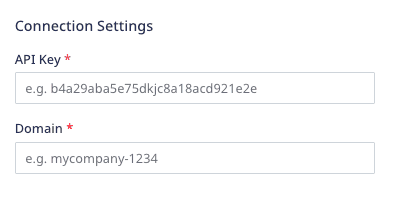
- API Key: Enter your Freshsales API key.
- Domain: Enter the subdomain of your Freshsales account. For example, if your organization URL is
testcompany.myfreshworks.com, then the subdomain istestcompany.
Identify
You can use the identify call to create or update your Freshsales contact.
RudderStack uses the Freshsales Upsert a Contact API to pass the relevant user information via the following parameters:
| Attribute | Type | Description |
|---|---|---|
unique_identifier | String | RudderStack passes the user's email. |
contact | Hashed Object | RudderStack passes the other relevant user details required to create or update the user in Freshsales. |
email already exists, the contact details are updated. Otherwise, RudderStack creates a new user in Freshsales.A sample identify call is shown below:
rudderanalytics.identify("1hKOmRA4GRlm", { email: "alex@example.com", firstName: "Alex", lastName: "Keener", state: "Louisiana", country: "USA", postalCode: "90009",});Supported mappings
The following table lists the mappings between the RudderStack and Freshsales properties:
| RudderStack property | Freshsales property | Presence |
|---|---|---|
traits.email, context.traits.email | emails | Required |
userId | id | Optional |
traits.firstname, traits.first_name, traits.firstName,context.traits.firstname, context.traits.first_name, context.traits.firstName | first_name | Optional |
traits.lastname, traits.last_name, traits.lastName,context.traits.lastname, context.traits.last_name, context.traits.lastName | last_name | Optional |
traits.subscriptionStatus, context.traits.subscriptionStatus | subscription_status | Optional |
traits.job_title, traits.jobTitle, context.traits.job_title, context.traits.jobTitle | job_title | Optional |
traits.phone, context.traits.phone | work_number | Optional |
externalId | external_id | Optional |
traits.mobileNumber, context.traits.mobileNumber | mobile_number | Optional |
traits.address, context.traits.address | address | Optional |
traits.address.city, traits.city, context.traits.address.city, context.traits.city | city | Optional |
traits.address.state, traits.state, context.traits.address.state, context.traits.state | state | Optional |
traits.address.postalcode, traits.zip, traits.zipcode, context.traits.zip, context.traits.zipcode, context.traits.address.postalcode | zipcode | Optional |
traits.address.country, traits.country, context.traits.address.country, context.traits.country | country | Optional |
traits.salesAccounts, context.traits.salesAccounts | sales_accounts | Optional |
traits.territoryId, context.traits.territoryId | territory_id | Optional |
traits.LeadSourceId, context.traits.LeadSourceId | lead_source_id | Optional |
traits.ownerId, context.traits.ownerId | owner_id | Optional |
traits.subscriptionTypes, context.traits.subscriptionTypes | subscription_types | Optional |
traits.medium, context.traits.medium | medium | Optional |
traits.campaignId, traits.campaign_id, context.traits.campaignId, context.traits.campaign_id, context.campaign.name | campaign_id | Optional |
traits.keyword, context.traits.keyword, context.campaign.term | keyword | Optional |
traits.timeZone, context.traits.timeZone | time_zone | Optional |
traits.facebookUserName, context.traits.facebookUserName | facebook | Optional |
traits.twitterUserName, context.traits.twitterUserName | twitter | Optional |
traits.linkedinUserName, context.traits.linkedinUserName | linkedin | Optional |
createdAt | created_at | Optional |
timestamp | updated_at | Optional |
traits.contactStatusId, context.traits.contactStatusId | contact_status_id | Optional |
traits.salesAccountId, context.traits.salesAccountId | sales_account_id | Optional |
traits.lifecycleStageId, context.traits.lifecycleStageId | lifecycle_stage_id | Optional |
Group
The group call lets you link an identified Freshsales contact with a company, organization, or an account. You can also record any custom group traits like the company name, number of employees, etc.
RudderStack uses the Upsert an Account API to create or update a sales account via the following parameters:
| Attribute | Type | Description |
|---|---|---|
unique_identifier | String | RudderStack passes the account name. |
sales_account | Hashed Object | RudderStack passes the other relevant details associated with the Freshsales account. |
- If
namealready exists, the Freshsales account details are updated. Otherwise, a new account is created. - RudderStack also checks if the contact's
emailis present in thecontext.traitsobject. If yes, RudderStack links the contact to the Freshsales account.
A sample group call is shown below:
rudderanalytics.group( "group01", { name: "Alex Keener", phone: "1234567890", numberOfEmployees: 51, annualRevenue: 10000, zipcode: 90009, street: "6649 N Blue Gum Street", city: "New Orleans", state: "Louisiana", country: "USA" }, { context: { traits: { email: "alex@example.com" } } });Supported mappings
The following table lists the mappings between the RudderStack and Freshsales properties:
| RudderStack property | Freshsales property | Presence |
|---|---|---|
name | name | Required |
traits.industryTypeId, context.traits.industryTypeId | industry_type_id | Optional |
traits.businessTypeId, context.traits.businessTypeId, traits.business_type_id, context.traits.business_type_id | business_type_id | Optional |
phone | phone | Optional |
traits.numberOfEmployees, context.traits.numberOfEmployees | number_of_employees | Optional |
traits.annualRevenue, context.traits.annualRevenue | annual_revenue | Optional |
traits.address, context.traits.address | address | Optional |
traits.city, traits.address.city, context.traits.city, context.traits.address.city | city | Optional |
traits.state, traits.address.state, context.traits.state, context.traits.address.state | state | Optional |
traits.country, traits.address.country, context.traits.country, context.traits.address.country | country | Optional |
zipcode | zipcode | Optional |
traits.website, `context.traits.website | website | Optional |
traits.territoryId, `context.traits.territoryId | territory_id | Optional |
traits.parentSalesAccountid, `context.traits.parentSalesAccountid | parent_sales_account_id | Optional |
traits.ownerId, `context.traits.ownerId | ownerId | Optional |
traits.facebookUserName, context.traits.facebookUserName | facebook | Optional |
traits.twitterUserName, context.traits.twitterUserName | twitter | Optional |
traits.linkedinUserName, context.traits.linkedinUserName | linkedin | Optional |
createdAt | created_at | Optional |
timestamp | updated_at | Optional |
FAQ
Where can I find the Freshsales API key?
To obtain your Freshsales API key, follow these steps:
- Log into your Freshsales dashboard.
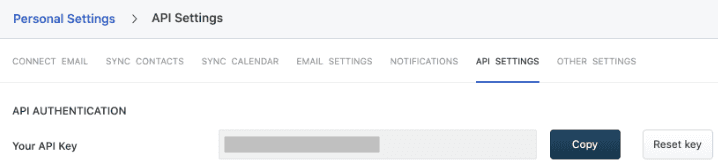
- Go to Personal Settings > API Settings.
- Enable the captcha to complete the authentication process.
- You will find your Freshsales API key listed under the API Authentication section, as shown:
Contact us
For more information on the topics covered on this page, email us or start a conversation in our Slack community.